
SmartReply vs Brandwise
SmartReply vs Brandwise for AI Customer Service
SmartReply answers Gmail and website chats, moderates comments, handles reviews, and connects customer requests to AI action decisions and delivery recovery. Brandwise also offers social and support automation. The reason to choose SmartReply is the complete conversation, action, investigation, and follow up workflow.
Reviewed November 5, 2026. Published by SmartReply.
The main difference
SmartReply brings moderation and customer service together with separate AI action decisions, reviews, delivery evidence, carrier investigations, and reimbursement preparation. Compare the work completed after the comment or email, including the action, the customer update, and any merchant recovery.
Scroll across the table to read both tools.
| What to compare | SmartReply | Brandwise |
|---|---|---|
| Customer conversations | Contextual AI replies with your product knowledge, tone, and action rules. | AI moderation and generated replies are documented. Brandwise moderation |
| Email, chat, and channel coverage | Gmail, website chat, social conversations, comments, and supported reviews. | The product covers comments, DMs, email, and live chat. Brandwise product |
| Actions and decisions | A conversation agent creates the request; a separate AI decides approve, decline, or manual review. | Shopify and a knowledge base supply context during setup. Brandwise setup |
| Operating the automation | Brand instructions, review controls, separate action decisions, and alerts for manual work. | Moderation rules and publishing controls govern public responses. Brandwise moderation |
| Billing model | Credits for automated work. Include the full support workload in the estimate. | Moderation checks and generated replies use documented AI credits. Brandwise credits |
Sources: Gmail customer service; Website chat; AI action decisions; Action notifications and reminders; Queue health alerts; Carrier investigations and delivery evidence; Shipping reimbursement claims; Follow up settings; TikTok Shop reviews; Google review management; SmartReply ChatGPT plugin
One AI support platform for email, website chat, social, and reviews
SmartReply is built to run your customer service across Gmail, website chat, Instagram, Facebook, WhatsApp, TikTok, TikTok Shop, and other connected channels. It answers product questions, handles order conversations, moderates public comments, and works through customer requests. You do not need a separate helpdesk just because a customer emails you or uses your website chatbot.
Connect Gmail for automated email replies and use website chat for product recommendations and support. Give the agent your products, policies, and reply instructions. Customers get an answer that fits the question and the channel.
AI creates the action. A separate AI decides what happens.
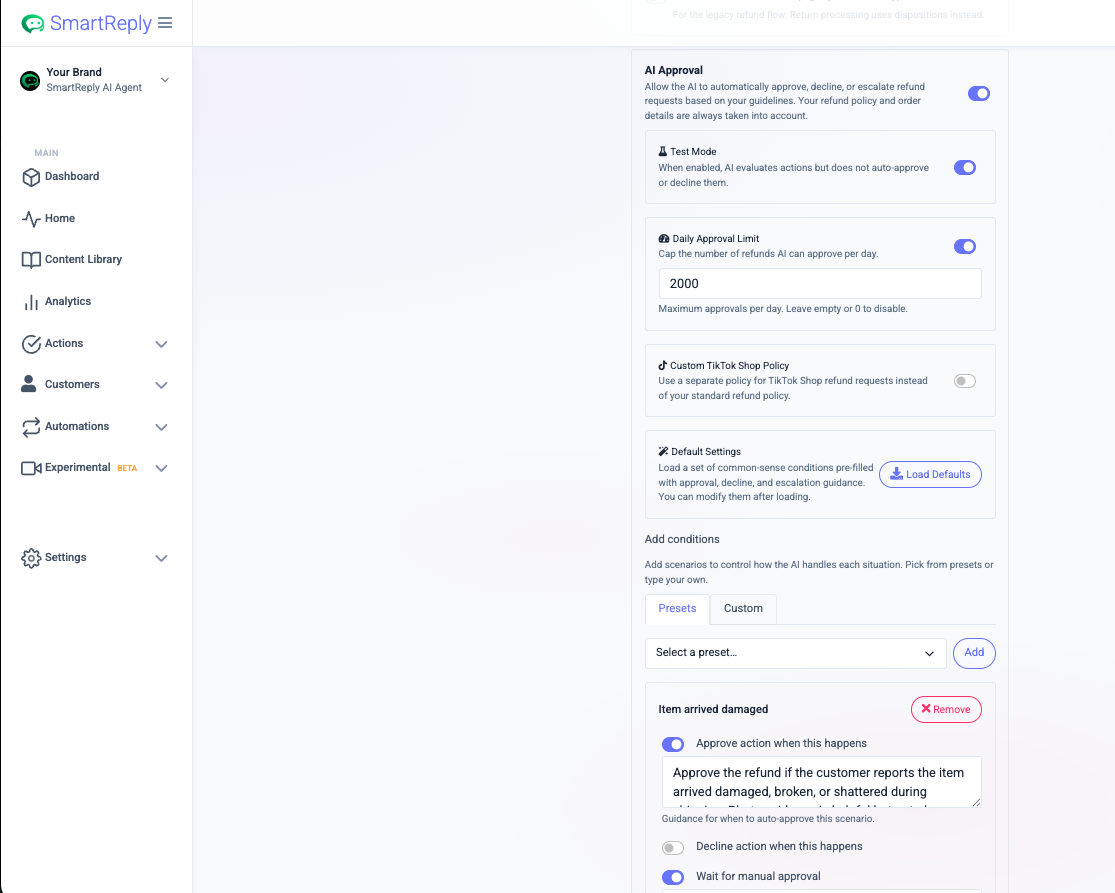
The conversation agent gathers the context and creates an action request, such as a refund, replacement, cancellation, or address change. SmartReply's separate AI Action Approvals process evaluates that request against your rules and the available evidence. It can approve, decline, or wait for manual approval. This separates understanding the customer from deciding what your business should do.
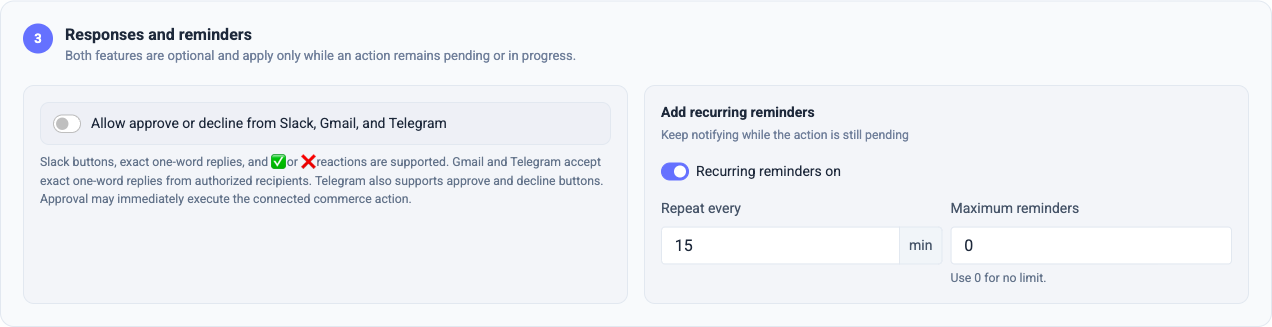
You control the decision instructions, test mode, and approval limits. Action Notifications can notify the right team when a request needs review, then repeat reminders while it remains pending. Authorized teammates can approve or decline from Slack, Gmail, or Telegram when you enable that option. Separate operational alerts monitor queue health and can escalate unacknowledged incidents.
Delivery evidence, carrier outreach, and reimbursement work
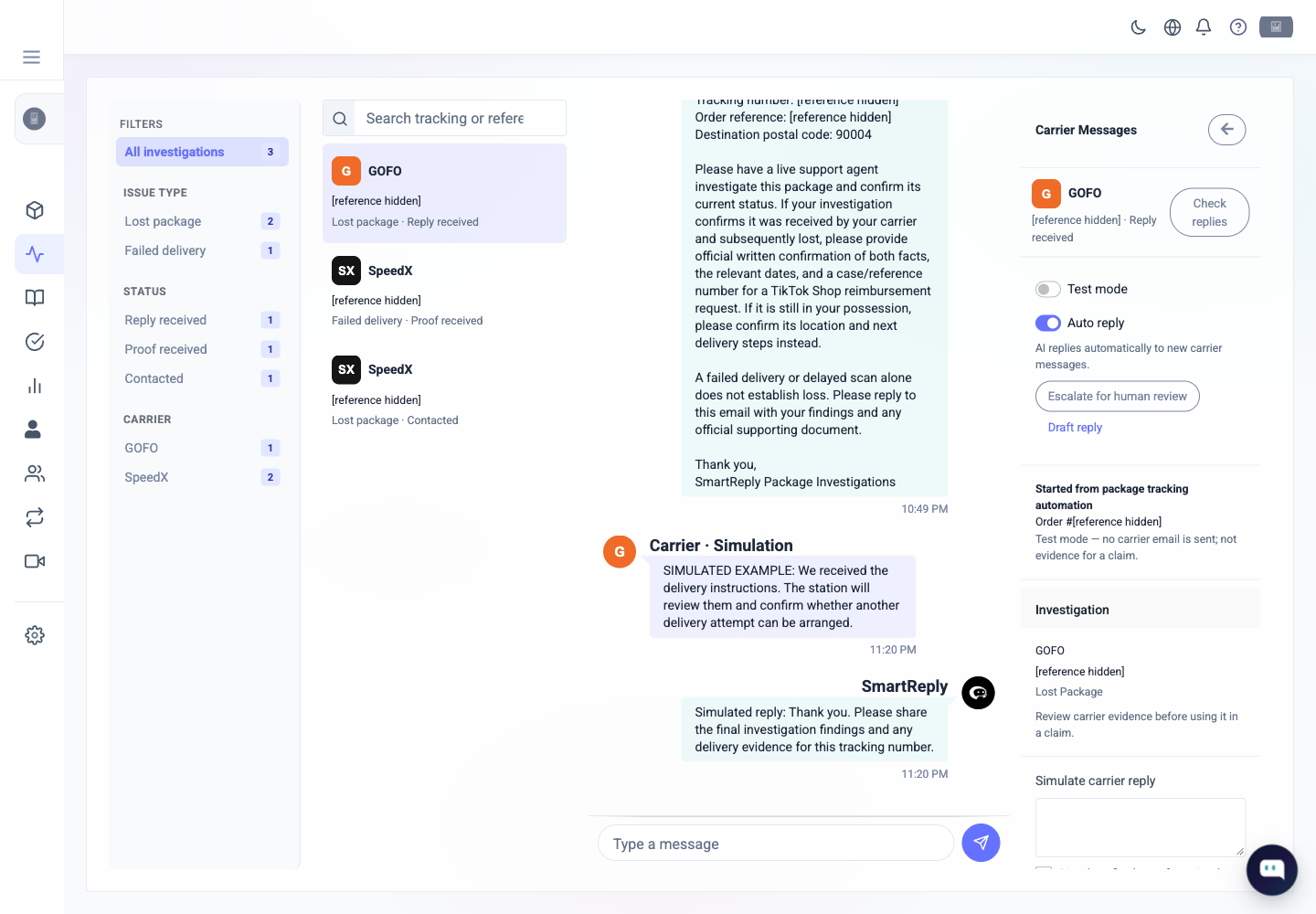
A customer saying “my order never arrived” needs more than another tracking link. SmartReply brings tracking, available proof of delivery photos, customer messages, and carrier findings into the support workflow. Your team can investigate what happened and use the evidence for the next decision.
Carrier investigations can contact supported carriers, pass on delivery instructions, collect their replies, and keep the customer conversation informed. That gives your team a way to work on failed deliveries and stalled shipments while there is still a chance to recover the delivery. Carrier contact methods and delivery photo availability depend on the carrier and shipment.
For eligible TikTok Shop cases, SmartReply also helps prepare shipping reimbursement claims with tracking, photos, customer correspondence, and carrier evidence. Recovering a merchant reimbursement and resolving the customer's request are both part of the work. Carrier retries and claim approvals remain decisions made by the carrier or marketplace.
Reviews, comment moderation, and AI follow ups
SmartReply handles Google review replies and TikTok Shop review management alongside customer conversations. Its AI comment moderation applies your instructions to spam, harmful comments, product questions, and genuine complaints. You decide what should be answered, hidden, ignored, or handed to your team.
AI follow ups keep conversations moving after the first answer. Configure when the agent should reengage, update customers about unresolved issues, and bring a person in. Use CSAT visibility and conversation review to find service problems and improve the workflow. Customer satisfaction comes from completing the work and following through.
Replies that sound like your team
SmartReply generates replies from the conversation, your knowledge, and your brand instructions. Your team does not have to choose a canned paragraph for every situation. Set the length, tone, vocabulary, and punctuation you want, including short answers without em dashes. Review examples and refine the agent when a reply sounds wrong.
The SmartReply ChatGPT plugin gives you another way to inspect agents, improve instructions, test questions, and work supported account tasks. Configure and test the support operation from a conversation, while SmartReply continues handling the enabled customer workflows.
Good moderation is the beginning of the workflow
SmartReply applies your instructions to the comment itself: answer a product question, hide spam, keep a legitimate complaint visible, or move personal order details into private support. A complaint can then become an order investigation rather than disappearing behind a generic apology.
Brandwise also documents AI moderation. Compare outcomes on the same real comments. Include mixed language, misspelled spam, an upset buyer, and a question that depends on the product in the post.
Sources: Brandwise product; Brandwise moderation; Brandwise setup; Brandwise credits
Email, website chat, and reviews belong in the same evaluation
SmartReply handles Gmail and website conversations as core support channels. It also manages Google review replies and TikTok Shop reviews. Your team can work on the customer issue across these entry points instead of treating each one as a separate tool purchase.
Brandwise describes email and live chat as well as social. Include the exact review channels, action controls, and customer follow ups you need in the comparison. A label in an inbox is not automatically a connection to the review platform itself.
Sources: Brandwise moderation
Separate a reply from an operational decision
In SmartReply, the conversation agent creates the action request and a separate AI evaluates approval, decline, or manual review. Your team gets configured alerts for work that needs attention. This is different from choosing whether to publish a drafted comment.
Use a refund request with delivery evidence to compare the actual workflow. Ask how the proposed Brandwise setup makes the decision, executes the action, and continues the customer conversation.
Sources: Brandwise setup
Evaluate the work after a failed delivery
SmartReply can combine delivery photos and tracking with carrier investigations and customer updates. It also helps prepare eligible shipping reimbursement claims. This is part of reducing the support work and losses around an order.
Compare the same case across your proposed Brandwise tools and SmartReply. Include the evidence gathered, carrier contact method, customer follow up, and staff time. Use current credit definitions for both products rather than treating every generated reply as equal.
Sources: Brandwise credits
Moving your support operation from Brandwise
If you already use Brandwise, bring your current email, chat, social, and order workflows into the evaluation. Identify what SmartReply can take over, where customer context needs to move, and which approval rules your team wants to keep. Compare the full support operation before deciding which tools to retain.
When to choose SmartReply
Choose SmartReply to run AI customer service across Gmail, website chat, social conversations, and reviews, with action decisions and customer follow through in the same operation. Its value includes moderation, separate AI approvals, manual review alerts, delivery evidence, carrier investigations, reimbursement preparation, and AI follow ups. TikTok Shop is a deep integration within that wider platform.
Ask for these examples in a demo
- A Gmail customer asking for a replacement, from the first reply through the action decision.
- A website shopper comparing products, followed by an order or return question.
- An action that should wait for manual approval and notify the responsible teammate.
- A failed delivery using available delivery photos, carrier correspondence, and customer follow ups.
- A review and a genuine ad complaint that need different responses.
- A short reply in your voice and a supported instruction test through the SmartReply ChatGPT plugin.
Use anonymized examples from your store. Check the completed result, the approval decision and what happens if the action fails. Do not compare a live action in one product with a draft message in another.
Common questions
Can SmartReply replace Brandwise for email and website customer service?
SmartReply supports automated Gmail replies and website customer service alongside social conversations, reviews, and ecommerce actions. Evaluate it for your full support operation, including the integrations, customer history, and workflows you need to migrate.
How do SmartReply AI action decisions work?
The conversation agent collects the context and creates an action request. A separate AI evaluates it against your approval, decline, and manual review instructions. Your configured alerts can notify the team when human attention is needed.
Does SmartReply help after a delivery fails?
Yes. SmartReply combines tracking and available delivery evidence with supported carrier investigations and customer updates. It can also help prepare eligible TikTok Shop reimbursement claims. Carrier contact methods, evidence availability, and claim outcomes depend on the shipment and provider.
Sources checked for this comparison
The links support the product details above. A missing feature in a source is not proof that a product can never support it. Confirm the current integration, plan and region when a workflow matters to your decision.
See how your team would use SmartReply
Bring the questions, order requests and approval rules your team works with today. See the reply, the action decision, the team alert, and the follow up across your customer service channels.
Book a demoExplore Support AI · Explore website chat · Open the ChatGPT plugin