Ecommerce customer service automation turns customer chats into work done. SmartReply gathers the facts and creates an action. It can then decide based on your rules and tell the customer the result.
Example flow. Changing the view does not change a real customer action.
1. Conversation AI qualifies and creates
The AI talks to the customer, checks the request, gathers the needed details, and creates the right action. The facts stay with the action.
Example: a refund request with the order, reason, and required evidence attached.
2. Approval AI makes the decision
A second AI checks the action, the proof, and your rules. It can approve, decline, negotiate, or send the case for review.
AI decisions under your policies
The action completes and the customer gets an update
The approved action runs through the connected service. SmartReply keeps the result with the request and updates the customer. Your team can handle exceptions or failed steps.
Five AI actions for everyday ecommerce requests
Each action has two steps. First, AI checks the request and creates the action. Then a person or the second AI makes the call. Choose the mode and rules that fit your store.
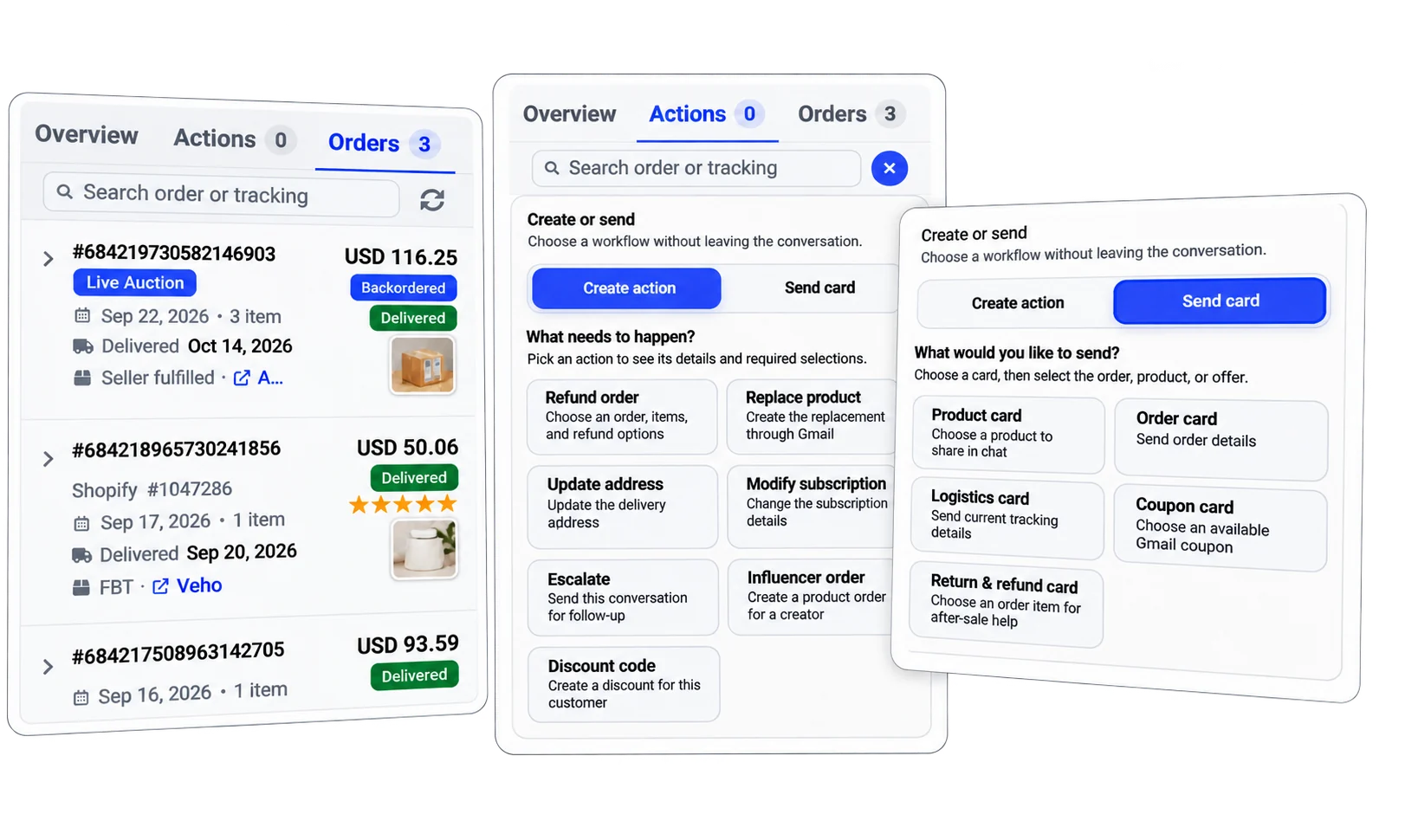
Order details, actions, and cards stay with the conversation. AI can qualify the request and create the action without your team taking over each chat. Select the image to view it full size.
Refund Order
Returns and partial refunds
Step 1: The first AI checks what the customer needs. It finds the order, the reason, and any proof needed for a refund or return.
Step 2: The second AI can decide based on your rules. This can include a partial refund. A teammate can also approve or decline.
Replace Product
Replacements and exchanges
Step 1: The AI finds out what the customer wants to replace or exchange. It gathers the facts for that action.
Step 2: The second AI checks your rules and makes the call. The store carries out the approved action. Your team can review the cases you choose.
Modify Subscription
Supported subscription changes
Step 1: The AI asks what change the customer wants. It checks the account details to see what can be done.
Step 2: The second AI decides based on the rules for your plans. Or let a teammate review the action and make the call.
Generate Discount Code
Discount requests and customer offers
Step 1: The AI finds out why a code is needed. It creates the action so it is ready for a decision.
Step 2: The second AI checks if the request fits your rules. Your team can also approve or decline before the code is made.
Update Shipping Address
Customer requests to change a delivery address
Step 1: The AI finds the order and collects the address the customer wants to use. It prepares an address update action.
Step 2: The AI uses your rules and the order facts to decide. The store then runs the approved change. What can change depends on the state of the order.
Actions run through the store or service you connect. The same system works across your channels. You set the rules, the proof needed, and which cases your team reviews.
Ask your AI assistant to create an action
Your team can start an action with a simple request. Use SmartReply through MCP, the ChatGPT plugin, or the AI assistant inside the app.
“Refund order 12345.”
“Send a replacement to @customername.”
The assistant creates the action from your request. It then goes through your approval setup. Your team can click to approve or decline, or the approval AI can make the decision under your rules. Creating an action and completing it are separate steps.
Start with manual approval. Use fully automatic decisions when ready.
Semi automatic: your team clicks to decide
The first AI gathers the facts and creates the action. Your team can review it without taking over the chat. Alerts and reminders show the right people which actions still need a decision.
Fully automatic: the second AI decides
The second AI uses your rules and the facts to decide. It can process requests without a teammate checking each one. The team focuses on cases that need extra help.
Use action approval test mode to see what the AI would decide without approving or declining the action. Review the results, refine your rules, and enable live AI decisions for the cases you choose. You can keep team approval where you want it.
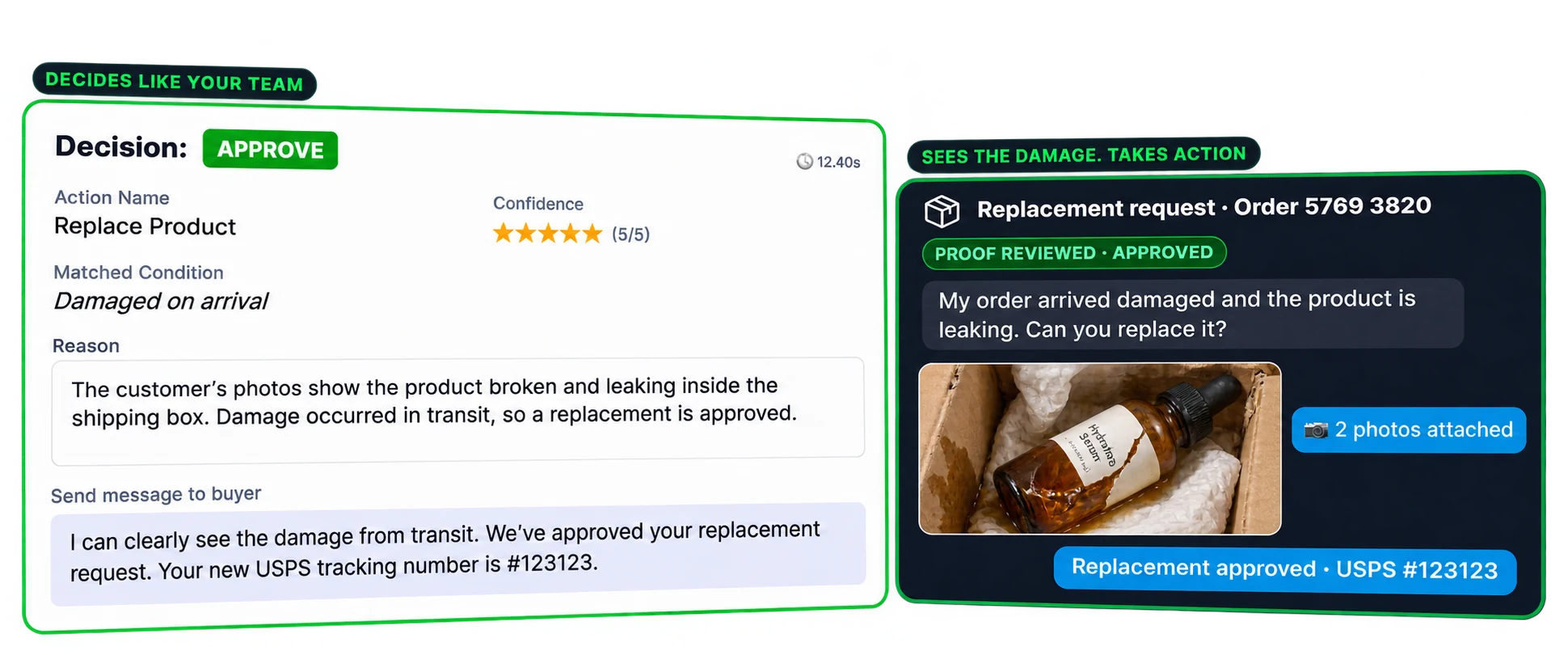
The approval AI can review customer photos, match the request to your rules, and decide on a replacement. This example shows the decision, the reason, and the customer update. Select the image to view it full size.Read the action approval guide and download the test worksheet
The same action system across all your connected channels
Customers can ask for help in Gmail, website chat, social messages, comments, or reviews. Each request goes through the same checks and decision steps.
Gmail
Website chat
Facebook and Messenger
Instagram
WhatsApp
TikTok Shop
Comments and reviews
If a request starts in public, move order details to a private chat. The AI can gather the facts and create the action. Your team does not have to guide each customer through every step.
Order tracking, product questions, carrier investigations, AI follow ups, comment moderation, and review replies sit alongside the action system. Explore the wider SmartReply customer service platform.
Questions about AI actions and decisions
Can AI make refund and other customer service decisions?
Yes. SmartReply's approval AI checks the action, the proof, and your rules. It can approve, decline, negotiate, or ask your team to review. You choose which calls the AI makes on its own.
What are the two AI steps?
First, the conversation AI talks to the customer. It checks the request and creates an action. Next, the approval AI checks that action and decides based on your rules. You can also choose to have a teammate make that call.
Can we start with manual approval?
Yes. AI can handle the chat and prepare each action. Your team clicks to approve or decline. Test mode lets you see how the AI would decide before you turn on live AI decisions.
Does this work across channels?
Yes. The same action system works with requests from your connected channels, including Gmail, website chat, and social support. The action runs through the connected store or service. Move private order details out of public comments before handling them.
Does the support team still need to talk to every customer?
No. The first AI can handle the chat and gather the facts. The second AI can decide what to do next. Your team handles cases sent for review and any others you choose.
What happens if an action needs more information or fails?
The AI can ask for missing details. Your rules decide when a person should review the case. Pending or failed actions still need work. The customer should get a success update only once the action is done.
See a customer request become a completed action
Bring a refund, exchange, subscription, discount, or address change request to a demo. See the AI qualify it, create the action, make the decision, and update the customer.