
SmartReply vs Zendesk
SmartReply vs Zendesk for AI Customer Service
SmartReply runs AI customer service across email, website chat, social conversations, comments, and reviews. Choose it when you want your agent to understand a request, create the action, apply a separate AI decision, and follow through on delivery and customer issues. You do not have to choose between strong everyday support and deep ecommerce automation.
Reviewed November 5, 2026. Published by SmartReply.
The main difference
SmartReply puts the AI agent, customer channels, action decisions, and follow through at the center of support. Your team can run email, website, social, and review workflows while AI handles the conversation and a separate AI evaluates supported actions under your rules.
Scroll across the table to read both tools.
| What to compare | SmartReply | Zendesk |
|---|---|---|
| Customer conversations | Contextual AI replies with your product knowledge, tone, and action rules. | AI agents can resolve conversations and take actions in authorized systems. Zendesk AI platform |
| Email, chat, and channel coverage | Gmail, website chat, social conversations, comments, and supported reviews. | Suite products include ticketing, messaging, voice, and other service tools. Zendesk pricing |
| Actions and decisions | A conversation agent creates the request; a separate AI decides approve, decline, or manual review. | AI action configuration and agent permissions determine the workflow. Zendesk AI action documentation |
| Operating the automation | Brand instructions, review controls, separate action decisions, and alerts for manual work. | Its AI documentation describes automated workflows and assisted agent work. Zendesk AI platform |
| Billing model | Credits for automated work. Include the full support workload in the estimate. | Seats and AI usage affect the complete subscription cost. Zendesk pricing |
Sources: Gmail customer service; Website chat; AI action decisions; Action notifications and reminders; Queue health alerts; Carrier investigations and delivery evidence; Shipping reimbursement claims; Follow up settings; TikTok Shop reviews; Google review management; SmartReply ChatGPT plugin
One AI support platform for email, website chat, social, and reviews
SmartReply is built to run your customer service across Gmail, website chat, Instagram, Facebook, WhatsApp, TikTok, TikTok Shop, and other connected channels. It answers product questions, handles order conversations, moderates public comments, and works through customer requests. You do not need a separate helpdesk just because a customer emails you or uses your website chatbot.
Connect Gmail for automated email replies and use website chat for product recommendations and support. Give the agent your products, policies, and reply instructions. Customers get an answer that fits the question and the channel.
AI creates the action. A separate AI decides what happens.
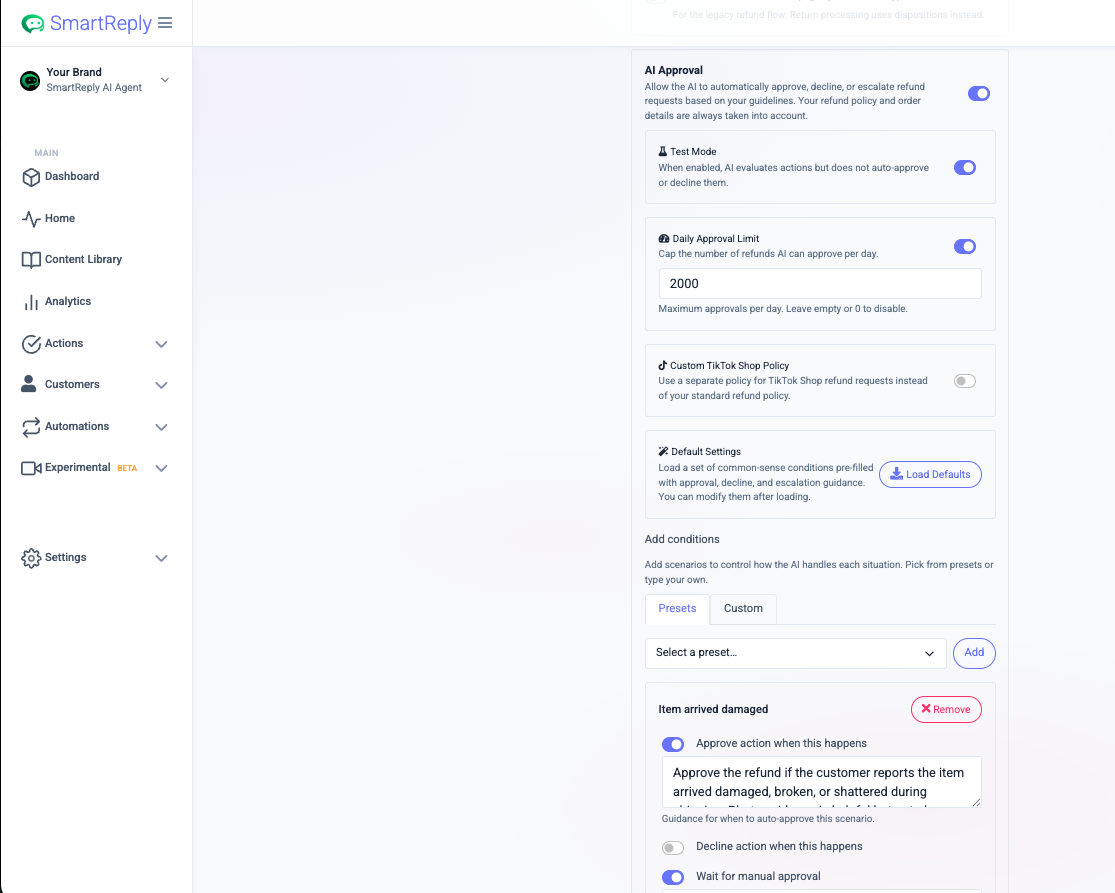
The conversation agent gathers the context and creates an action request, such as a refund, replacement, cancellation, or address change. SmartReply's separate AI Action Approvals process evaluates that request against your rules and the available evidence. It can approve, decline, or wait for manual approval. This separates understanding the customer from deciding what your business should do.
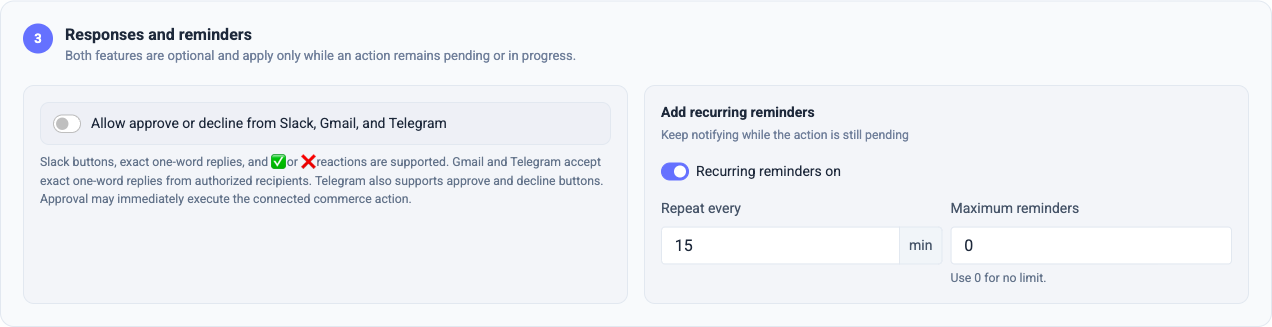
You control the decision instructions, test mode, and approval limits. Action Notifications can notify the right team when a request needs review, then repeat reminders while it remains pending. Authorized teammates can approve or decline from Slack, Gmail, or Telegram when you enable that option. Separate operational alerts monitor queue health and can escalate unacknowledged incidents.
Delivery evidence, carrier outreach, and reimbursement work
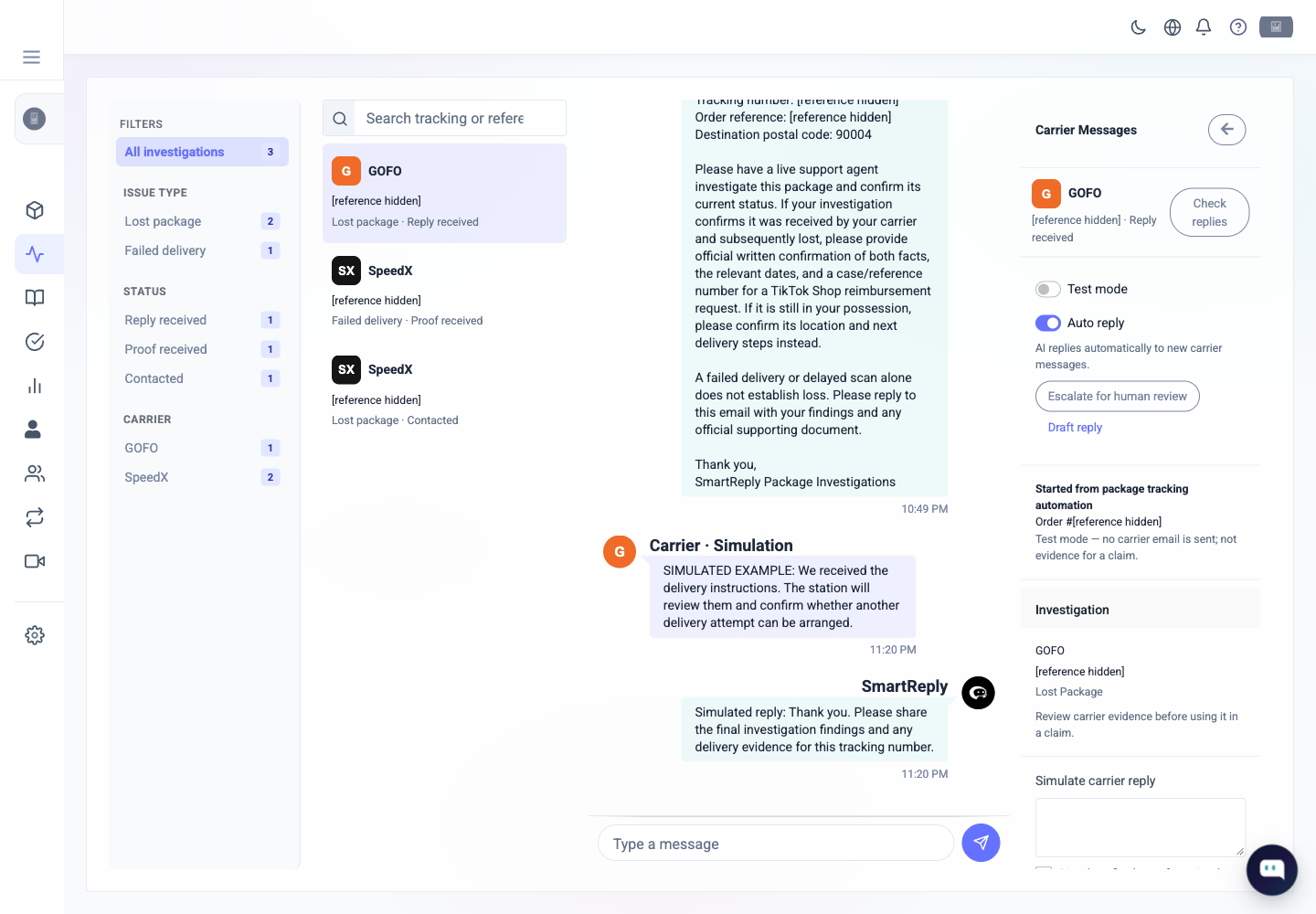
A customer saying “my order never arrived” needs more than another tracking link. SmartReply brings tracking, available proof of delivery photos, customer messages, and carrier findings into the support workflow. Your team can investigate what happened and use the evidence for the next decision.
Carrier investigations can contact supported carriers, pass on delivery instructions, collect their replies, and keep the customer conversation informed. That gives your team a way to work on failed deliveries and stalled shipments while there is still a chance to recover the delivery. Carrier contact methods and delivery photo availability depend on the carrier and shipment.
For eligible TikTok Shop cases, SmartReply also helps prepare shipping reimbursement claims with tracking, photos, customer correspondence, and carrier evidence. Recovering a merchant reimbursement and resolving the customer's request are both part of the work. Carrier retries and claim approvals remain decisions made by the carrier or marketplace.
Reviews, comment moderation, and AI follow ups
SmartReply handles Google review replies and TikTok Shop review management alongside customer conversations. Its AI comment moderation applies your instructions to spam, harmful comments, product questions, and genuine complaints. You decide what should be answered, hidden, ignored, or handed to your team.
AI follow ups keep conversations moving after the first answer. Configure when the agent should reengage, update customers about unresolved issues, and bring a person in. Use CSAT visibility and conversation review to find service problems and improve the workflow. Customer satisfaction comes from completing the work and following through.
Replies that sound like your team
SmartReply generates replies from the conversation, your knowledge, and your brand instructions. Your team does not have to choose a canned paragraph for every situation. Set the length, tone, vocabulary, and punctuation you want, including short answers without em dashes. Review examples and refine the agent when a reply sounds wrong.
The SmartReply ChatGPT plugin gives you another way to inspect agents, improve instructions, test questions, and work supported account tasks. Configure and test the support operation from a conversation, while SmartReply continues handling the enabled customer workflows.
Start with an AI service operation, not another ticket workflow
SmartReply gives you an agent that answers Gmail, helps shoppers on your website, responds to social conversations, and manages supported customer actions. The goal is to complete customer service work without requiring a teammate to shepherd every conversation through a ticket process.
Zendesk offers AI as well as ticketing. The practical comparison is how much configuration, additional tooling, and daily team work your actual operation needs. Put ordinary email and website support in that comparison alongside social and marketplace requests.
Sources: Zendesk AI platform; Zendesk AI action documentation; Zendesk pricing; TikTok Zendesk connector guide
Create the action and evaluate the decision separately
In SmartReply, the customer conversation can lead to an internal action request. Another AI evaluates that request using your approval, decline, and manual review instructions. Your team controls the policy and gets alerted about work needing attention.
Zendesk documents external actions and a TikTok Shop connector with agent return decisions. Those are real capabilities. Compare the exact automated decision process and exception handling with SmartReply rather than treating an approve button as the whole workflow.
Sources: Zendesk AI action documentation
Include the work outside the inbox
SmartReply includes review replies, AI comment moderation, customer follow ups, and delivery investigation workflows. These are part of customer service even when they do not arrive as a conventional ticket.
A failed delivery can require proof, carrier contact, customer updates, and a reimbursement claim. SmartReply brings those steps into the support process. Compare the tools and setup needed to accomplish the same chain in the Zendesk proposal.
Sources: Zendesk pricing
Compare the full cost of running support
For Zendesk, include the required seats, AI usage, and products or integrations in the quote. For SmartReply, estimate the comments, messages, and actions you expect to automate using the current credit model.
Keep the workload fixed: email, chat, reviews, social questions, and delivery exceptions. Count the team time left after automation as well as the subscription. A lower cost per answer does not tell you the cost of finishing the case.
Sources: TikTok Zendesk connector guide
Moving your support operation from Zendesk
If you already use Zendesk, bring your current email, chat, social, and order workflows into the evaluation. Identify what SmartReply can take over, where customer context needs to move, and which approval rules your team wants to keep. Compare the full support operation before deciding which tools to retain.
When to choose SmartReply
Choose SmartReply to run AI customer service across Gmail, website chat, social conversations, and reviews, with action decisions and customer follow through in the same operation. Its value includes moderation, separate AI approvals, manual review alerts, delivery evidence, carrier investigations, reimbursement preparation, and AI follow ups. TikTok Shop is a deep integration within that wider platform.
Ask for these examples in a demo
- A Gmail customer asking for a replacement, from the first reply through the action decision.
- A website shopper comparing products, followed by an order or return question.
- An action that should wait for manual approval and notify the responsible teammate.
- A failed delivery using available delivery photos, carrier correspondence, and customer follow ups.
- A review and a genuine ad complaint that need different responses.
- A short reply in your voice and a supported instruction test through the SmartReply ChatGPT plugin.
Use anonymized examples from your store. Check the completed result, the approval decision and what happens if the action fails. Do not compare a live action in one product with a draft message in another.
Common questions
Can SmartReply replace Zendesk for email and website customer service?
SmartReply supports automated Gmail replies and website customer service alongside social conversations, reviews, and ecommerce actions. Evaluate it for your full support operation, including the integrations, customer history, and workflows you need to migrate.
How do SmartReply AI action decisions work?
The conversation agent collects the context and creates an action request. A separate AI evaluates it against your approval, decline, and manual review instructions. Your configured alerts can notify the team when human attention is needed.
Does SmartReply help after a delivery fails?
Yes. SmartReply combines tracking and available delivery evidence with supported carrier investigations and customer updates. It can also help prepare eligible TikTok Shop reimbursement claims. Carrier contact methods, evidence availability, and claim outcomes depend on the shipment and provider.
Sources checked for this comparison
The links support the product details above. A missing feature in a source is not proof that a product can never support it. Confirm the current integration, plan and region when a workflow matters to your decision.
See how your team would use SmartReply
Bring the questions, order requests and approval rules your team works with today. See the reply, the action decision, the team alert, and the follow up across your customer service channels.
Book a demoExplore Support AI · Explore website chat · Open the ChatGPT plugin