
SmartReply vs Freshdesk
SmartReply vs Freshdesk for Ecommerce Automation
Freshdesk is an established ticketing platform with real AI automation. SmartReply focuses on ecommerce and social workflows, including supported TikTok Shop actions. Compare the daily work each can finish for your store.
Reviewed November 4, 2026. Published by SmartReply.
The main difference
Separate Freddy AI Copilot from Freddy AI Agent. Copilot helps a person work. AI Agent can handle conversations and workflows. Then check which product and connection can complete your shop's specific request.
Scroll across the table to read both tools.
| What to compare | SmartReply | Freshdesk |
|---|---|---|
| Agent assistance | Set knowledge and reply rules for automated customer conversations. | Copilot helps with drafts, summaries and contextual assistance. Freddy AI Agent and Copilot guide |
| AI automation | Connect supported shop actions with a separate approval evaluation. | Freddy AI Agent and Agent Studio support automated conversations and workflows. Freshworks AI workflow announcement |
| Email and chat | Choose from SmartReply's supported ecommerce and social channels. | Email AI Agent is in Freshdesk and Omni. Chat AI Agent requires Omni. Freddy AI Agent and Copilot guide |
| Usage costs | Estimate credits for automated comments, messages and actions. | Seats, AI sessions and other usage items can affect the bill. Freshdesk pricing |
Sources: SmartReply AI approvals; SmartReply on the TikTok Shop App Store; SmartReply TikTok Shop; SmartReply Social AI; SmartReply plans
A ticketing history does not make Freshdesk manual
Freshworks documents AI workflows for ecommerce and other industries. Its current product includes more than suggested replies. A fair comparison must account for what Freddy AI Agent can do, as well as the work Copilot helps an agent do.
The important difference is the path from a customer's question to the store action. Ask which parts are ready to use and which require configuration, an app or a custom connection. Keep that setup effort in your comparison.
Sources: Freshworks AI workflow announcement; Freddy AI Agent and Copilot guide
Check TikTok Shop decisions separately
A Shopify order workflow does not prove support for a TikTok Shop return. For either product, ask to see the exact shop, region and request you plan to automate.
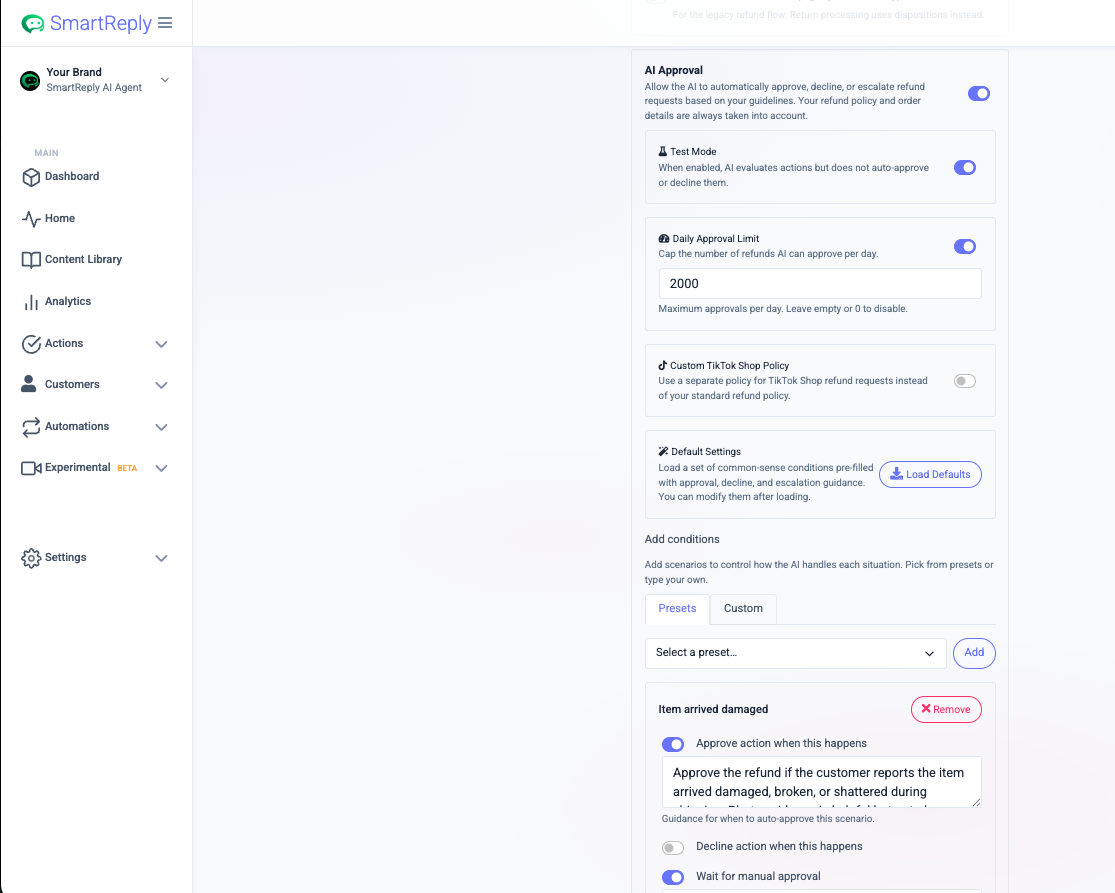
SmartReply's AI Action Approvals can evaluate supported requests against your policy. You can set approve, decline and manual review conditions, use test mode and apply a daily approval limit. This is useful when a reply alone does not settle the customer request.
Sources: SmartReply AI Action Approvals
Choose the right Freshdesk product before comparing channels
Freshdesk and Freshdesk Omni are not interchangeable names for the same channel package. The support guide distinguishes email AI agents from chat AI agents and says chat requires Omni. Check the quote for the product you actually need.
For SmartReply, map the channels where your customers contact you, including public comments. Then test a question that needs order context and a request that needs a decision. Count any handoff to a person or another tool.
Sources: Freddy AI Agent and Copilot guide
A session is not the same as a completed request
Freshdesk defines AI sessions by a time window. Its support guide gives separate windows for chat and email. That can matter when customers return later in the week or contact you through more than one channel.
Compare seats, AI session packs and the other usage items in your quote with SmartReply's credit estimate. Use a normal month and a busy month. Neither a session nor a credit should be treated as a promise that the customer's issue was resolved.
Sources: Freddy AI Agent and Copilot guide; Freshdesk pricing
When Freshdesk may fit better
Freshdesk may fit better when shared ticketing, a customer portal and service reporting are your main needs, especially if the team already uses Freshworks. Check the additional product and AI requirements for your channels.
When to choose SmartReply
SmartReply is worth a closer look when social conversations and TikTok Shop requests take time away from your team. The strongest test is a supported action that follows your policy and leaves a clear exception when it cannot proceed.
Ask for these examples in a demo
- A TikTok Shop return with enough evidence for approval.
- A return outside your policy that should be declined or reviewed.
- An order question coming from a social conversation.
- A repeat contact several days later, including its effect on usage.
Use anonymized examples from your store. Check the completed result, the approval decision and what happens if the action fails. Do not compare a live action in one product with a draft message in another.
Common questions
Does Freshdesk have autonomous AI?
Yes. Freshdesk offers Freddy AI Agent and AI Agent Studio as well as Copilot. Confirm the exact workflow and channel rather than judging the whole product by its drafting features.
Is chat AI included in ordinary Freshdesk?
The Freshdesk support guide reviewed here says Chat AI Agent requires Freshdesk Omni. Email AI Agent is available in both Freshdesk and Omni. Verify the current package before buying.
Sources checked for this comparison
The links support the product details above. A missing feature in a source is not proof that a product can never support it. Confirm the current integration, plan and region when a workflow matters to your decision.
See how your team would use SmartReply
Bring the questions, order requests and approval rules your team works with today. We will walk through the supported workflow and what still needs a person.
Book a demo